
If you are reading this, you have probably seen the error “SSL certificate problem: certificate has expired” in an application that connects to third-party APIs or systems, possibly while connecting to ours over HTTPS. Here is a quick fix for outdated systems.
Why do these SSL errors happen?
The DST Root CA X3 root certificate in your system has expired. This mainly affects older systems, mostly Linux, whose root certificate store has not been updated.
The certificate, part of the Let’s Encrypt chain, expired on September 30, 2021. Systems that have not been updated may reject HTTPS connections to services using that chain after this date. It affects older systems worldwide that have not gone through a certificate update, especially Ubuntu 14.04 and 16.04.
The problem is not Let’s Encrypt having a bad or unsupported certificate chain. It’s broken software on the client end that’s applying the rules for validating certificate chains incorrectly. (A user on Super User)
Read the Let’s Encrypt announcement for details.
How to fix the expired certificate
Ubuntu
- Reconfigure the CA certificates:
sudo dpkg-reconfigure ca-certificates - On the screen that appears, choose Yes to continue.
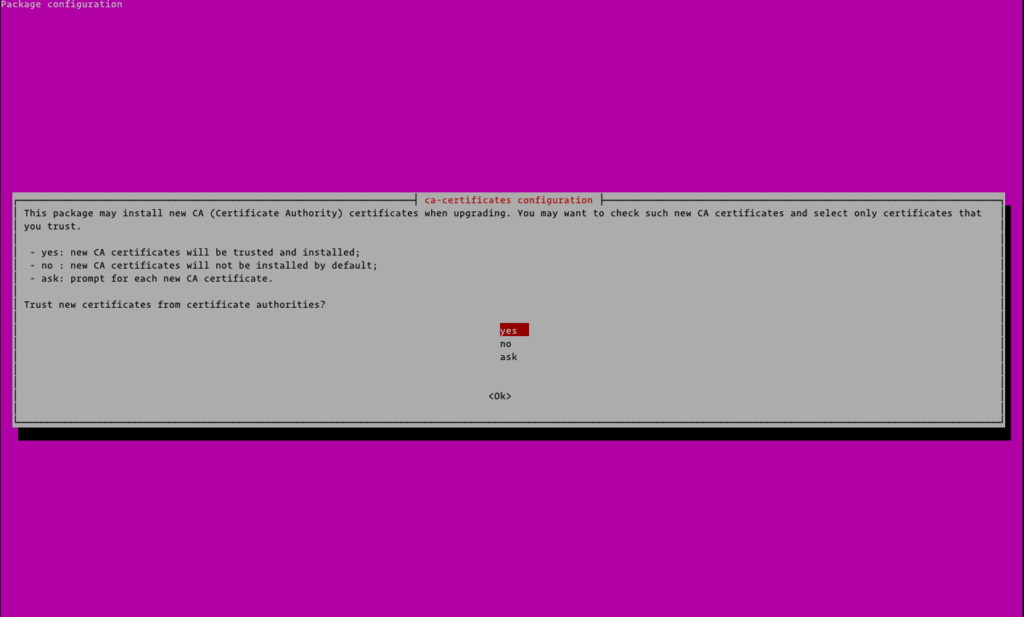
- On the next screen, use the arrow keys to scroll to mozilla/DST_Root_CA_X3.crt.
- Press the space bar to deselect it, so the star next to it disappears.
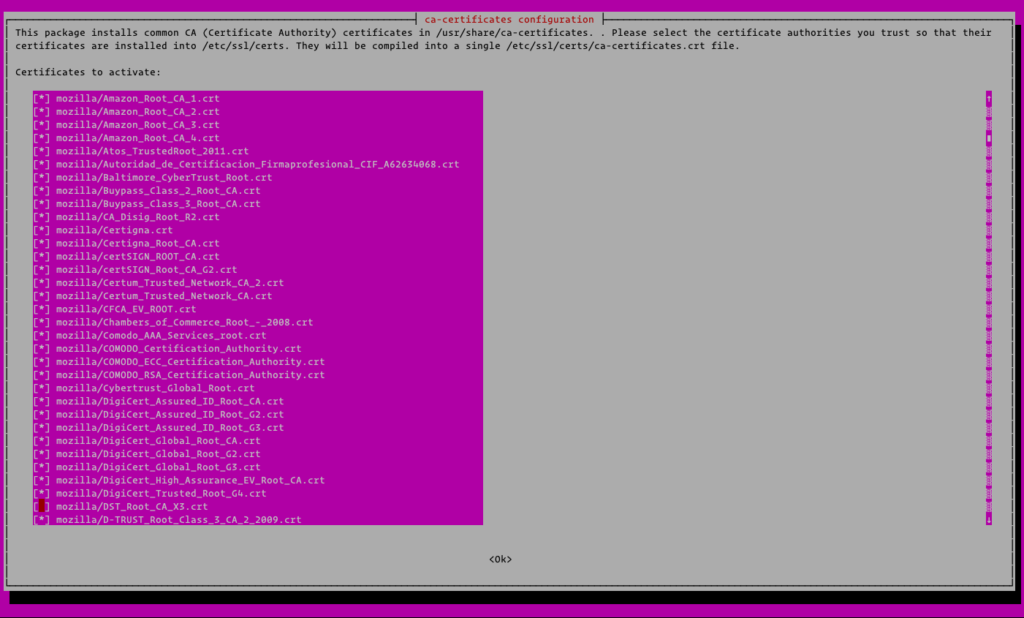
- Press Enter to confirm. Your CA certificates are reconfigured and the expired one is removed.
Other systems
Search for “DST_Root_CA_X3” with the name of your operating system. Many older systems are affected, and fixes are widely documented, including in this Super User thread.
How to prevent this in future
Keep your software up to date and apply the security patches your DevOps team recommends.
Ubuntu 14.04 and 16.04 are both past their standard support period, so upgrading to a supported release is the lasting fix.
The expired certificate message in Postman
If you test our APIs with Postman, update to the latest version. Postman released a fix for the old certificates.